
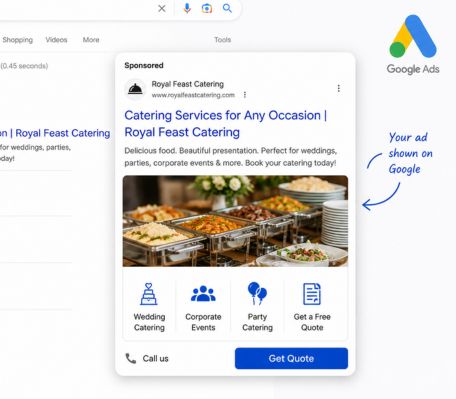
Google Ads is one of the few channels where you can put your catering business in front of a buyer who is actively searching for exactly what you offer, right now, in your city. Not hoping they will come across your Instagram. Not waiting for a former client to pass your name along. Capturing demand that already exists.
The challenge is that Google Ads rewards structure and intentionality. A carelessly built campaign will burn through the budget without producing a single qualified lead. A well-built one can be the most consistent new-client channel you have.
This is a step-by-step guide to setting up Google Ads for a catering company, from the first keyword search to your first converted lead.
Why does Google Ads work well for catering companies?
Catering is an intent-driven purchase. When someone searches "corporate catering near me" or "office lunch catering for 50 people," they are not browsing. They are buying. The search itself is the signal that they have a need, a budget, and a decision to make.
That is the environment where Google Search Ads operate. You are not interrupting someone who was thinking about something else. You are answering a question they just asked. That targeting efficiency is difficult to replicate on any other channel.
Catering also has relatively high average order values. A single corporate catering account placing weekly orders can be worth tens of thousands of dollars annually. The return on a well-structured Google Ads campaign that brings in even two or three accounts a month is significant, which means the math on cost-per-acquisition works in your favor when the campaign is run correctly.
Step 1: Define your campaign goal before you open Google Ads
Every decision you make in Google Ads flows from your goal. Before setting up a single campaign, get specific about what a conversion means for your business.
For most catering companies, the goal is a qualified inquiry: a phone call, a form submission, or a direct booking request. Not a website visit. Not a page view. A contact from someone who has a real catering need and a real timeline.
Write this down before you start: what does a successful outcome from this campaign look like? How many inquiries per month do you need to justify the spend? What is a new catering client worth to you over a year? Knowing the lifetime value of a client helps you set a realistic cost-per-acquisition target, which shapes your budget from the beginning.
If you are targeting both corporate catering and event catering, treat these as separate goals with separate campaigns. The buyer is different, the search terms are different, and the ad copy that converts each one is different.
Step 2: Do keyword research the right way
Keyword research is where most catering Google Ads campaigns either succeed or waste money. The goal is to find the specific phrases buyers are actually typing when they are ready to hire a caterer, and to avoid the broad, irrelevant terms that generate clicks from people who will never convert.
Start with intent, not volume
High search volume sounds appealing but it often reflects low intent. "Catering ideas" gets a lot of searches. Almost none of those people are ready to hire a caterer. "Corporate catering services Chicago" gets fewer searches, but every person typing that phrase is a potential client.
Build your keyword list around transactional intent. These are phrases that contain signals of readiness: service-type words, location modifiers, and occasion-specific terms.
Keyword categories to target
Service + location: "catering services Austin," "office catering Dallas," "corporate lunch catering Seattle"
Occasion + location: "corporate event catering near me," "office lunch delivery for large groups," "breakfast catering for meetings"
Buyer role + need: "catering for corporate offices," "catering for HR events," "team lunch catering"
Competitor brand terms: Searching your direct competitors by name can surface buyers who are evaluating options and have not yet committed.
Use Google Keyword Planner
Google Keyword Planner is free inside your Google Ads account. Enter a seed term like "corporate catering" and it will surface related terms, estimated monthly search volumes, and average cost-per-click data. Pay attention to CPC estimates. High-CPC keywords signal strong commercial intent. They cost more per click because advertisers know those searchers convert.
Download the keyword suggestions and sort them by a combination of relevance, intent, and estimated CPC. Build your initial list from the top 30 to 50 terms before trimming down to the ones you will actually bid on.
Build your negative keyword list from day one
Negative keywords are the terms you explicitly block so your ads do not show for irrelevant searches. This is one of the highest-impact optimizations in any Google Ads campaign and most beginners skip it entirely.
For a catering company, a starter negative keyword list should include: recipes, catering jobs, catering equipment, catering supplies, DIY catering, catering school, catering courses, catering trailer, catering van, free catering, cheap catering.
Without a negative keyword list, a broad match campaign for "catering services" will serve your ad to people searching for catering supply wholesalers, catering jobs boards, and cooking school enrollment pages. You pay for every click. None of them convert.
Step 3: Structure your campaign around your catering services
A well-structured Google Ads account has one campaign per objective, with ad groups inside each campaign organized by a specific theme or service. This structure is not just organizational tidiness. It directly affects your Quality Score, which determines how much you pay per click and how prominently your ads appear.
Recommended campaign structure for catering
Campaign 1: Corporate Catering - Ad groups: office lunch catering, corporate event catering, team meeting catering, recurring corporate catering
Campaign 2: Event Catering - Ad groups: wedding catering, gala catering, private event catering, birthday and social events
Campaign 3: Branded - Ad groups: your restaurant or catering brand name, to capture anyone searching directly for you
Keep each ad group tightly themed. An ad group called "corporate catering" should contain keywords exclusively about corporate catering, with ad copy written specifically for that buyer. Mixing corporate and wedding keywords into one ad group forces you to write generic copy that resonates with neither audience.
Match types: how to control who sees your ads
Every keyword in your campaign needs a match type assigned to it. Match type controls how closely a search query needs to match your keyword before your ad is shown.
Broad match: Widest reach, least control. Google shows your ad for searches it considers related to your keyword. Useful for discovery but expensive when not paired with strong negative keyword lists.
Phrase match: Your ad shows for searches that include your keyword phrase in order. "Office catering Chicago" in phrase match will show for "best office catering Chicago" and "affordable office catering Chicago" but not for "Chicago catering office supplies."
Exact match: Your ad shows only when someone searches your exact keyword phrase. Lowest reach, highest intent. [corporate catering services] in exact match only triggers for that precise search.
For catering companies starting out, phrase match and exact match on your highest-intent keywords is the recommended approach. It limits wasted spend while you gather data on what actually converts.
Step 4: Write ad copy that speaks to the buyer, not the food
The most common mistake in catering Google Ads copy is writing about the food instead of the buyer's problem. A headline that says "Delicious Catering for Every Occasion" tells the buyer nothing that distinguishes you from every other caterer on the page.
The buyer searching for corporate catering has one dominant concern: will this vendor make my job easier, or create more work for me? Your ad copy needs to answer that question before anything else.
Headline structure that converts
Google Responsive Search Ads allow up to 15 headline options, each up to 30 characters. Google's system tests combinations and surfaces the ones that perform best. Write at least 8 to 10 distinct headlines covering different angles.
Problem-led: "No-Hassle Corporate Catering," "Same-Day Catering for Offices," "Zero Coordination Stress"
Credibility-led: "Trusted by 500+ Companies," "Catering for Google, Pita Pit, McAlister's," "5-Star Corporate Caterer"
Specificity-led: "Lunch Catering From $9 Per Person," "Min. 10 People, Full Setup Included," "Delivery + Setup Included"
CTA-led: "Get a Quote in 60 Seconds," "Book a Free Tasting Today," "Order Online, Deliver Tomorrow"
Description lines
You get two description lines, each up to 90 characters. Use the first to reinforce your main value proposition. Use the second to handle the most common objection or surface a specific detail that builds confidence.
Example description 1: "Hot and cold box lunches, dietary options included. On-time delivery for offices of 10 to 500."
Example description 2: "No minimums for repeat clients. Direct ordering, no marketplace fees. Book in under 5 minutes."
Avoid vague superlatives. "Best catering in the city" says nothing. "Delivered to 300+ offices in Austin last quarter" says something a buyer can evaluate.
Step 5: Send clicks to a dedicated landing page, not your homepage
This is where a significant percentage of Google Ads budget is quietly wasted. Someone clicks your ad for "corporate catering Chicago," lands on your restaurant homepage, sees a hero image of your dining room, and has no immediate path to what they were looking for. They leave. You paid for that click.
Every ad group should have a corresponding landing page that matches the search intent of the keywords in that group. A corporate catering ad group should send traffic to a page built specifically for corporate buyers, with corporate-relevant copy, social proof from business clients, a visible inquiry form, and a clear next step.
What a converting catering landing page needs?
Above the fold: A headline that matches the ad and confirms the buyer is in the right place. "Corporate Catering in [City] for Teams of 10 to 500."
Social proof: Logo bar of recognizable clients or a short testimonial from an office manager or HR coordinator. Not a chef review. The buyer is not a food critic.
Menu summary: Format options, per-person pricing guide, dietary options handled. Buyers need to know quickly if you can serve their group size and accommodate requirements.
Form: Short. Name, company, event date, group size, contact. Five fields maximum. Every additional field reduces submission rate.
Phone number: Prominently visible. Some buyers, especially for larger orders, want to call before committing to a form. Make it easy.
Speed matters too. A landing page that takes more than three seconds to load on mobile will lose a significant portion of your traffic before they read a single word.
Step 6: Set up conversion tracking before spending a dollar
Running Google Ads without conversion tracking is like running a restaurant without a POS system. You know you are busy, but you have no idea what is actually making money.
Conversion tracking tells Google Ads which clicks led to a real outcome: a form submission, a phone call, a booking confirmation. Without it, Google has no signal to optimize toward and your campaign has no feedback loop for improvement.
What to track for a catering business?
Form submissions: Install the Google Ads conversion tag on your form confirmation page (the page a visitor lands on after submitting). Every pageview on that URL counts as a conversion.
Phone calls: Google Ads has a native call tracking feature that creates a forwarding number displayed in your ads and on your landing page. Calls above a defined duration, typically 60 seconds, are counted as conversions.
Click-to-call on mobile: Set up a separate conversion action for mobile users who tap your phone number directly from the ad. This is a high-intent signal.
Once conversion tracking is live and registering events, you have real data to work with. You can see which keywords are driving inquiries, which ad copy combinations are converting, and which landing pages are producing results versus burning spend.
Step 7: Set your budget and choose the right bidding strategy
Starting budget
In competitive metro markets like New York, Chicago, or Los Angeles, catering keywords can cost $4 to $12 per click. At $50 per day, you are buying roughly 5 to 12 clicks. That is not a large volume, but it is enough to start identifying which keywords are generating inquiries versus which are eating spend.
Resist the urge to start with a large budget before the campaign is validated. Get the structure right, get conversion tracking confirmed, and run for two to four weeks before scaling.
Bidding strategy
Manual CPC: You set the maximum bid for each keyword. Gives full control. Recommended for the first 30 days while you are collecting data.
Maximize Clicks: Google automatically sets bids to get the most clicks within your budget. Useful for driving initial traffic but does not optimize for conversions.
Target CPA (Cost Per Acquisition): Once you have at least 30 conversions recorded, you can tell Google what you are willing to pay per inquiry and it adjusts bids automatically. This is the goal state for a mature campaign.
Maximize Conversions: Google spends your full daily budget toward getting the most conversions. Works well once conversion data is established. Not recommended before tracking is confirmed.
Step 8: Use ad extensions to take up more space and add information
Ad extensions expand your ad with additional information and additional links, at no extra cost per click. They increase the size of your ad on the results page, which improves visibility and click-through rate, and they surface answers to common buyer questions before the click even happens.
Sitelink extensions: Link directly to specific pages. "View Catering Menu," "Get a Quote," "See Corporate Packages," "Contact Us." These give buyers a direct path to what they are looking for.
Callout extensions: Short phrases that highlight your differentiators. "Setup Included," "Dietary Options Available," "Same-Day Orders Welcome," "No Marketplace Fees."
Call extension: Adds your phone number directly to the ad on desktop and a tap-to-call button on mobile. For service businesses, this is one of the highest-value extensions available.
Location extension: Connect your Google Business Profile to show your address alongside the ad. Builds local trust and supports map placement.
Structured snippet extensions: Highlight specific service categories. "Types: Corporate Lunch, Box Lunch, Hot Bar, Breakfast Catering, Team Meals."
Use all relevant extensions. Google selects which ones to show based on the query, so adding more gives the algorithm more to work with without any additional cost.
Step 9: Monitor, optimize, and repeat weekly
A Google Ads campaign is not a set-it-and-forget-it channel. The first two to four weeks are primarily a data-collection period. After that, optimization is a weekly discipline.
Search terms report: This is the single most important report in your Google Ads account. It shows you the actual search queries that triggered your ads, not just the keywords you bid on. Review it weekly. Add converting terms as keywords. Add irrelevant terms to your negative keyword list. This report is where budget waste is caught and where new keyword opportunities are found.
Quality Score: Google assigns each keyword a Quality Score from 1 to 10 based on the relevance of your keyword, your ad copy, and your landing page. A high Quality Score means you pay less per click and rank higher than competitors with lower scores even if they are bidding more.
Improve Quality Score by tightening the relationship between keyword, ad copy, and landing page. A keyword about corporate catering should trigger an ad about corporate catering that links to a landing page built for corporate catering buyers.
Key metrics to track weekly
CTR (Click-Through Rate): How often people click after seeing your ad. A strong CTR for catering is 5 to 10 percent on branded terms, 2 to 5% on non-branded.
Conversion Rate: The percentage of clicks that result in a form submission or phone call. A well-optimized catering campaign should convert at 5 to 15%.
Cost Per Conversion: How much you paid on average for each inquiry. Compare this to the lifetime value of a catering client to evaluate campaign health.
Search Impression Share: The percentage of eligible searches where your ad actually showed. Low impression share means your budget or Quality Score is limiting visibility.
Step 10: Add remarketing to re-engage visitors who did not convert
Only a fraction of visitors who click your catering ad will convert on the first visit. Most people research multiple vendors before making a decision, especially for larger corporate accounts. Remarketing keeps your catering business visible to those buyers as they continue their evaluation.
Google Display remarketing shows visual ads on millions of partner websites to people who previously visited your catering landing page. A buyer who viewed your corporate catering page, left without submitting a form, and is now reading a news article sees your ad again. That repeated visibility builds recall and often captures the conversion on a second or third touchpoint.
Set up a remarketing audience in Google Ads for visitors to your catering landing pages who did not reach the confirmation page. Run display ads with a clear message and a specific incentive: "Still looking for a corporate caterer? Get a free tasting for groups of 20 or more."
Remarketing clicks cost significantly less than search clicks and reach buyers who already know who you are. It is one of the most efficient uses of a catering Google Ads budget once your search campaigns are running.
Google Ads is a system, not a one-time setup
The restaurants and catering companies that get consistent results from Google Ads are not the ones who built the best campaign on day one. They are the ones who treat the campaign as a system that improves over time, with weekly reviews, structured testing, and an honest relationship between spend and outcome.
The structure in this guide gives you the foundation. Keywords grouped by intent, ad copy written for the buyer instead of the food, landing pages that match the search, and conversion tracking that tells you what is actually working.
Build it right the first time, review it weekly, and the pipeline it produces compounds. A single well-run Google Ads campaign can be the most predictable new-client channel a catering company has.
Frequently Asked Questions
What keywords should catering companies bid on in Google Ads?
Focus on high-intent, transactional keywords: service plus location combinations like "corporate catering Chicago," occasion-specific terms like "office lunch catering for large groups," and buyer-role terms like "catering for HR events." Avoid broad informational keywords with low purchase intent.
What is a negative keyword and why does it matter for catering?
A negative keyword prevents your ad from showing for irrelevant searches. For a catering company, blocking terms like "catering jobs," "catering equipment," "catering recipes," and "catering school" prevents budget waste on clicks from people who will never become clients. Building a strong negative keyword list from day one is one of the highest-return optimizations in Google Ads.
Should catering companies send Google Ads traffic to their homepage?
No. Traffic should go to a dedicated landing page that matches the search intent of the ad. A click on a corporate catering ad should land on a page built specifically for corporate buyers, with relevant copy, pricing guidance, social proof from business clients, and a short inquiry form. Homepage traffic converts at a fraction of the rate of a purpose-built landing page.
How long does it take for Google Ads to work for a catering business?
The first two to four weeks are primarily a data-collection period. Meaningful optimization begins once the campaign has gathered enough click and conversion data to identify what is working. Most well-structured catering campaigns start producing consistent qualified inquiries within 30 to 60 days of launch.
What is remarketing and should catering companies use it?
Remarketing shows ads to people who visited your catering website but did not convert. These are warm prospects who already know your brand. Remarketing clicks cost less than search clicks and often capture conversions from buyers who needed a second touchpoint before committing. It is one of the most efficient additions to a catering Google Ads strategy once the core search campaigns are running.

.png)
.svg)


.png)

